

Overview:
- How to use the Click Generator in one sentence: buy a plan, log in, submit a landing page URL (not a bare affiliate link), connect a free click tracker, and judge the results after 2 to 4 weeks (BirajReview, 2026).
- The Click Generator (TCG) is a cloud-based traffic tool that rotates your link through a shared member pool, and the entry plan costs about $5 per month (Click Generator Review 2026, StackBlitz, 2026).
- Reviewers disagree on traffic quality, so treat TCG as a testing tool for landing pages and offers, not as a sales machine.
- This guide gives you 7 setup steps, a 30-day beginner plan, a metrics table, and 7 mistakes I made so you can skip them.
- Bottom line: TCG is a cheap way to practice affiliate marketing basics, but it will not replace SEO, email, or paid ads.
If you want to learn how to use the Click Generator without wasting your first month’s budget, this guide is for you. I have worked in affiliate marketing for 8 years. I have also made most of the beginner mistakes that come with traffic tools, and I will share them honestly so you do not repeat them.
This article assumes you know nothing. I explain every term when it first appears, and I give you the exact order of steps I follow today.
What Is the Click Generator and How Does It Work?
The Click Generator, shortened to TCG in this guide, is a cloud-based tool that sends clicks to the link you submit. According to its official site, it rotates clicks across members’ links so every member gets equal exposure (The Click Generator, official site, 2025). You do not install anything. You log in to a web dashboard (Marketer Saif, 2026).
Think of TCG like a shared bulletin board at a busy market. Everyone pins up a flyer, and the board shows each flyer to passing visitors in turn. You get seen, but the visitors came to browse the board, not specifically for your flyer.
That analogy matters because it sets the right expectation. TCG gives you visitors fast. It does not guarantee those visitors want what you promote.
Here is the basic flow in four lines:
- You buy a plan and receive login details.
- You submit the URL (web address) of the page you want visited.
- The system rotates your URL through its member pool.
- You measure what visitors do with your own tracking tool.
Is the Click Generator Worth It for Affiliate Marketing Beginners?
For most beginners, TCG is worth trying only as a low-cost testing tool. The entry plan costs around $5 per month, with a discounted yearly option and a one-time upgrade near $197 (Click Generator Review 2026, StackBlitz, 2026). That price makes it a cheap experiment, but reviewers disagree on traffic quality.
Some reviews describe the traffic as aimed at make-money-online and affiliate marketing audiences (DeviantArt review, 2025). Other reviews say the traffic is not targeted, converts poorly, and bounces often (Click Generator Review 2026, StackBlitz, 2026).
Whether it is worth the money depends on how well you understand how to use the Click Generator as a testing tool. My own view sits closer to the second group. I treat TCG as a way to see how a page behaves under traffic, not as a source of buyers.
Here is a quick comparison of when it makes sense and when it does not:
| Situation | Is TCG a good fit? | Reason |
|---|---|---|
| You have a $5 to $20 test budget | Yes | The cost is low enough to learn from mistakes |
| You want to test a landing page headline | Yes | You get visits quickly to compare versions |
| You need sales this week | No | Click exchange traffic rarely converts on its own |
| You run a large paid ad budget | No | Paid ads give you targeting controls TCG lacks |
| You want a long-term business | Partly | Use TCG for testing, then build SEO or email |
Affiliate Marketing Basics You Need Before Using Any Traffic Tool
Affiliate marketing means you promote another company’s product and earn a commission when someone buys through your unique link. Before you learn how to use the Click Generator, you need to understand five terms, because every mistake I made early came from skipping them.
- An affiliate link is a special URL that tracks sales back to you.
- An affiliate network (like ClickBank, ShareASale, or WarriorPlus) is the platform that hosts offers and pays you.
- A landing page is a single web page built to get one action from a visitor.
- A squeeze page is a landing page that asks for an email address in exchange for something free.
- Conversion rate is the percentage of visitors who take the action you want.
Here are three more acronyms you will see later. CTR (click-through rate) is the share of people who click a link after seeing it. EPC (earnings per click) is the average money you earn for each click you send. ROI (return on investment) is your profit divided by your cost.
Why does this matter for TCG? Because traffic is only one part of the chain. A visitor must land on a page, trust you, take an action, and later buy. If any link breaks, clicks alone earn you nothing.
How to Use the Click Generator: What You Need Before You Start
To follow how to use the Click Generator step by step, you need four things: a destination page, a free email tool, a free click tracker, and a small budget. Gather them first. Starting without them is the most common beginner error I see, and I made it myself.
Use this checklist:
| Item | What it is | Free option |
|---|---|---|
| Destination page | The page visitors will land on (ideally a squeeze page) | Free plan of a landing page builder |
| Email tool | Collects and stores the emails you capture | Free tier of an email service |
| Click tracker | Counts clicks and shows where visitors go | BeMob free plan (BirajReview, 2026) |
| Test budget | Money you can afford to lose | $5 to $20 |
| Notebook or spreadsheet | Where you record every test | Any free spreadsheet |
A note on the tracker. TCG does not include built-in analytics, so a separate tracker is needed to see what your clicks do (BirajReview, 2026). I skip this step at my peril every time I get lazy, and the campaign turns into guesswork.
Before you buy anything, also read the rules of the affiliate network you plan to use. Some networks restrict certain traffic types. Check the terms so your account stays safe.
How to Use the Click Generator Step by Step
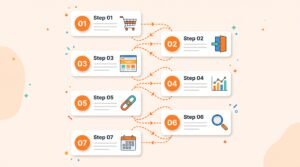
The full process for how to use the Click Generator takes about 5 minutes from payment to link submission, according to one review (BirajReview, 2026). The setup is quick because there is no software to install. The real work is the preparation you do before step 1.
Step 1: Buy Your Plan on the Official Site
Buy your plan through the official site, and payment is handled through WarriorPlus, a digital marketplace. After payment, WarriorPlus sends your login details within a few minutes (BirajReview, 2026).
Start with the entry plan only. You will see upsell offers (called OTOs, short for one-time offers) right after checkout. Skip them at first. I bought an upsell on day one in my early years and regretted it, because I had not yet proved the basic plan worked for my page. [REPLACE WITH YOUR OWN EXPERIENCE]
Step 2: Log In to the Member Dashboard
Log in with the credentials from your confirmation email, and you will reach the TCG members area. The dashboard is web-based, so it works on any device with internet access (Marketer Saif, 2026).
This step of how to use the Click Generator is easy, so do not rush past the details. Spend 10 minutes just looking around. Find where you submit a link, where plan details live, and where any training material sits. Knowing the layout now saves confusion later.
Step 3: Build a Squeeze Page (Do Not Send Traffic to a Bare Affiliate Link)
Build a simple squeeze page before you submit anything. A squeeze page has one headline, one short benefit list, and one email sign-up box. Sending visitors straight to an affiliate link gives you no data and no way to follow up.
Here is a basic layout:
- A headline that names one clear benefit.
- Two or three short bullet points explaining what the visitor gets.
- A sign-up form with a single field for email.
- A button with a plain action word, like “Send me the guide”.
I learned this the hard way. In my early years I pointed paid clicks directly at an affiliate link. I got clicks, but I could not tell who came, who left, or whether anyone cared.
Step 4: Connect a Free Click Tracker
Connect a free tracker like BeMob to your page before any traffic arrives. A tracker records clicks, sources, and sign-ups, so you can see how your campaign performs. TCG itself does not provide this, and skipping it leaves you blind (BirajReview, 2026).
Here is the simple process:
- Create a free account with the tracker.
- Add your squeeze page URL as the “offer” or destination.
- Copy the tracking link the tool gives you.
- Test the tracking link yourself and confirm it records one click.
This test takes two minutes. Do it every single time.
Step 5: Submit Your Tracked URL Inside the Dashboard
Paste your tracked link into the link field in the Click Generator dashboard. The official instructions describe this as the step where you enter the URLs of your landing pages, affiliate offers, or websites (The Click Generator, official site, 2025).
Use the tracked link, not your raw page URL. Double-check for typos. A single wrong character sends all your clicks to a dead page, and I have done that.
Step 6: Run a Small First Test
Run the first test small and short. Your goal is to confirm the setup works, not to earn money. Check that your tracker counts clicks, your page loads quickly, and your sign-up form delivers emails to your email tool.
Learning how to use the Click Generator is mostly about learning to test small before you scale. Test on both your phone and your laptop. Many visitors will see the page on a phone, and a form that breaks on mobile will lose most sign-ups.
Step 7: Review Results After 2 to 4 Weeks
Review your numbers after 2 to 4 weeks, not after 2 days. One guide recommends monitoring your opt-in rate (the percentage of visitors who join your email list) over 2 to 4 weeks (BirajReview, 2026). Short windows show noise instead of patterns.
I write down five numbers every week: clicks, opt-ins, opt-in rate, bounce rate, and revenue. I will explain each in the metrics section below.
How to Use the Click Generator to Test an Affiliate Offer (My Real Workflow)
I use TCG to test one change at a time on a landing page. The goal is simple: find out which headline or offer gets more email sign-ups, using cheap, fast traffic before I spend on better sources. This is how I apply what I know about how to use the Click Generator in real campaigns.
Here is the workflow I follow:
- Pick one offer and one squeeze page.
- Write two headline versions, called A and B.
- Run version A for two weeks and record results.
- Run version B for two weeks and record results.
- Keep the winner and test a new change.
This is called split testing (also known as A/B testing). You change only one thing at a time, so you know what caused the difference.
Here is a worked example using made-up numbers, only to show the math:
| Metric | Version A | Version B |
|---|---|---|
| Clicks | 1,000 | 1,000 |
| Email sign-ups | 30 | 45 |
| Opt-in rate | 3% | 4.5% |
In this hypothetical case, version B gets 50% more sign-ups from the same traffic. That is a real, usable finding. It tells me what to carry into better traffic sources.
Metrics Every Beginner Should Track When Learning How to Use the Click Generator
Track five numbers: clicks, opt-in rate, bounce rate, EPC, and cost per lead. These tell you whether your page, your offer, or your traffic is the weak point. Without them, you cannot improve anything, no matter how well you follow how to use the Click Generator.
| Metric | What it means | Formula |
|---|---|---|
| Clicks | Visits your tracker counted | Read from tracker |
| Opt-in rate | Percentage of visitors who joined your list | Sign-ups divided by clicks, times 100 |
| Bounce rate | Percentage who left without doing anything | Single-page visits divided by total visits, times 100 |
| EPC | Average earnings per click | Total revenue divided by total clicks |
| Cost per lead | What each email sign-up cost you | Total spend divided by sign-ups |
A high bounce rate tells you the visitors did not connect with your page. A low opt-in rate with a low bounce rate often means the headline is fine but the offer is weak.
Use a spreadsheet and update it weekly. Patterns appear after a few weeks, not a few days.
7 Mistakes I Made When Learning How to Use the Click Generator (So You Can Skip Them)
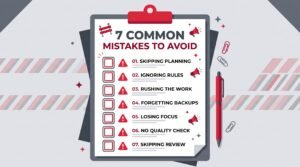
The most costly mistakes were sending traffic to a bare affiliate link, skipping the tracker, and judging results too early. I list all seven below with what I do now. Avoiding these mistakes is the fastest way to get value from how to use the Click Generator properly.
Mistake 1: Sending Traffic Straight to an Affiliate Link
Affiliate links give you no data, no email list, and no second chance with the visitor. Always send traffic to your own page first. Collect the email, then recommend the offer in follow-up messages.
Mistake 2: Running Without a Tracker
Without a tracker, you only know that “something happened.” You cannot tell which page, headline, or day performed better. Set the tracker up before anything else.
Mistake 3: Judging Results After Three Days
Early results are noisy. A few lucky or unlucky clicks can fool you. Wait at least two weeks per test, as the guidance above suggests.
Mistake 4: Expecting Sales Directly From Clicks
Clicks are not sales. Co-op style traffic means visitors did not search for your offer. “I once expected sales from my first batch of clicks and got none. I learned the sales came later, from email.”
Mistake 5: Changing Three Things at Once
If you change the headline, button color, and offer in one go, you will not know which change worked. Change one thing, record the result, then change the next.
Mistake 6: Buying Upsells Too Early
Upsells promise extra features, but you have not yet proven the basic plan works for you. Wait until you have at least one month of clean data. Then decide if an upgrade is worth it.
Mistake 7: Ignoring Network Rules and Disclosure
Affiliate networks and advertising rules exist for a reason. In the United States, the FTC (Federal Trade Commission) requires clear disclosure when you earn commissions from recommendations (FTC, 2023). Add a short disclosure near the top of every page and email.
How to Use the Click Generator for Beginners: A 30-Day Plan
A 30-day plan keeps you focused on learning instead of chasing quick money. Follow it week by week, and you will finish with a tested page, clean data, and a clear next step. This is the schedule I give new affiliates who ask me how to use the Click Generator.
| Week | Focus | Tasks |
|---|---|---|
| Week 1 | Preparation | Choose an offer, build a squeeze page, set up your email tool and tracker |
| Week 2 | First test | Buy the entry plan, submit your tracked link, confirm everything records correctly |
| Week 3 | Split test | Swap in headline B and compare opt-in rates |
| Week 4 | Review | Record all five metrics, decide what to keep, and plan the next traffic source |
Keep your daily time short. Thirty minutes a day is enough for the first month. Consistency beats long, rare sessions.
At the end of week 4, ask yourself three questions. Did my page collect emails? Did I learn something specific? What will I test next? If you can answer those, the month was a success, even if you earned nothing.
How Does the Click Generator Compare to Other Traffic Sources?
TCG is faster and cheaper to start than most other traffic methods, but it gives you less control over who visits. SEO, email, social media, and paid ads each trade speed, cost, and targeting differently. The right mix depends on your goal.
| Traffic source | Speed | Cost to start | Targeting control |
|---|---|---|---|
| Click Generator (co-op rotation) | Fast | Low | Low |
| SEO (search engine optimization) | Slow | Low money, high time | High |
| Email list | Medium | Low | High |
| Social media posting | Medium | Low money, high time | Medium |
| Paid ads | Fast | Medium to high | High |
Knowing how to use the Click Generator well also means knowing its limits. My approach is simple. I use TCG to test pages, then I move proven pages to SEO or email, where visitors are more interested in the topic.
Common Problems When You Use the Click Generator and How to Fix Them
Most problems come from missing tracking, slow pages, or unclear offers. The table below lists the issues I see most often and how I fix each one. Check this table before you assume the tool is broken.
| Problem | Likely cause | Fix |
|---|---|---|
| Tracker shows zero clicks | Wrong link submitted | Re-copy the tracked link and resubmit it |
| Clicks arrive but no sign-ups | Weak headline or form not working | Test the form on mobile, then try a new headline |
| High bounce rate | Page loads slowly or message is unclear | Compress images and simplify the headline |
| Sign-ups but no emails received | Email tool not connected | Check the form integration and spam folder |
| Results swing wildly day to day | Test window too short | Wait for 2 to 4 weeks before deciding |
Most people who struggle with how to use the Click Generator are fighting one of the five problems above. If none of these fix the issue, contact the support listed in your dashboard. Keep screenshots of your setup, since they speed up any support conversation.
Rules and Honesty: Staying Safe While You Learn How to Use the Click Generator
You should never promise income, hide your affiliate relationship, or break an affiliate network’s traffic rules. These rules protect your readers and your accounts. Following them also builds trust, which is the real long-term asset in this business.
Follow these basics:
- Disclose affiliate links clearly, near the top of the page (FTC, 2023).
- Do not claim guaranteed earnings.
- Read your affiliate network’s rules on traffic sources.
- Only share results you have actually recorded.
I add one more rule for myself. If a result is poor, I publish it anyway when it helps the reader. My readers have written to me more often about my failed tests than my wins.
My Verdict After Testing: Who Should Use the Click Generator
TCG suits beginners who want a cheap sandbox to practice split testing and tracking. It does not suit anyone who needs sales quickly or wants fine control over audience. Use it as a training tool, and plan to add better traffic sources as you grow.
To recap how to use the Click Generator the right way: prepare a squeeze page, connect a tracker, submit your tracked link, test one change at a time, and review after 2 to 4 weeks. That process matters more than the tool itself.
If you follow the 30-day plan above, you will finish the month with real data, a better page, and a clear idea of what to try next. That is a good return on a $5 experiment.
Frequently Asked Questions About How to Use the Click Generator
What is the Click Generator?
The Click Generator (TCG) is a cloud-based traffic tool that rotates your submitted link through a pool of member links so everyone receives clicks (The Click Generator, official site, 2025). You use it through a web dashboard with nothing to install.
How do I use the Click Generator as a complete beginner?
Buy the entry plan, log in, build a squeeze page, connect a free tracker, and submit your tracked link. Then wait 2 to 4 weeks before judging results (BirajReview, 2026). Following how to use the Click Generator in this order prevents the most common beginner errors.
How much does the Click Generator cost?
The entry plan is around $5 per month, with a discounted yearly option and a one-time upgrade priced near $197 (Click Generator Review 2026, StackBlitz, 2026). Prices can change, so confirm the current price on the official checkout page before buying.
Can I send the Click Generator traffic straight to an affiliate link?
You can, but I advise against it. A direct affiliate link gives you no data and no email list. A squeeze page lets you measure results and follow up with visitors, which is how most affiliate income is built over time.
Does the Click Generator guarantee sales?
No. One review states that the tool provides traffic but conversions are not guaranteed (Click Generator Review 2026, StackBlitz, 2026). Sales depend on your offer, page, and follow-up emails.
Do I need a click tracker to use the Click Generator?
Yes, I strongly recommend one. TCG does not include built-in analytics, so a free tracker like BeMob shows you what visitors do after they click (BirajReview, 2026).
How long should I test before deciding if the Click Generator works?
Test for 2 to 4 weeks per change. Shorter tests show random noise instead of real patterns. Record your numbers weekly in a spreadsheet.
Is the Click Generator good for long-term affiliate income?
It helps with testing and practice, but long-term income usually comes from sources like SEO, email, and content. Use TCG to validate pages, then move the best ones to higher-quality traffic.
Final Checklist Before You Start
Run this list before you apply how to use the Click Generator in a live campaign. Every item should be a yes.
- Your squeeze page is live and loads fast on mobile.
- Your email tool receives sign-ups correctly.
- Your tracker records a test click.
- You skipped the upsells for now.
- You wrote down your starting numbers.
- Your affiliate disclosure is visible.